Document Stages
Control the flow — filter, sort, skip, limit, deconstruct, and output documents.
← Previous | Index | Next: 05 - Structure Stages →
Document stages control which documents and how many flow through the pipeline. They don’t change the structure of documents — they only decide which ones pass through.
$match — Filter Documents
The $match stage filters documents using standard MongoDB query criteria. Only matching documents pass to the next stage.
db.<collection>.aggregate([
  { $match: <query criteria> }
]);
Example: Exclude certain project types
db.projects.aggregate([
  {
    $match: {
      $nor: [
        { type: "MANAGEMENT_PROJECT" },
        { type: "REQUEST_PROJECT" }
      ]
    }
  }
]);
// → Only RESEARCH_PROJECT documents pass through
Example: Filter by array size
db.projects.aggregate([
  {
    $match: {
      reviews: { $size: 4 }
    }
  }
]);
// → Only projects with exactly 4 reviews
Tip: Place
$matchas early as possible in your pipeline. It reduces the number of documents that subsequent stages need to process, improving performance.
$sort — Sort Documents
Reorders documents in the stream. The documents themselves remain unchanged.
db.<collection>.aggregate([
  {
    $sort: {
      <sort-key>: <sort-order>   // 1 = ascending, -1 = descending
    }
  }
]);
Example: Sort by title descending
db.projects.aggregate([
  { $match: { type: "REQUEST_PROJECT" } },
  { $sort: { title: -1 } }
]);
$skip — Skip Documents
Removes the first n documents from the stream. Useful for pagination together with $limit.
db.<collection>.aggregate([
  { $skip: <number_of_documents> }
]);
Example
db.projects.aggregate([
  { $match: { type: "REQUEST_PROJECT" } },
  { $skip: 1 }
]);
// → Skips the first matching document
$limit — Limit the Document Stream
Keeps only the first n documents and drops the rest.
db.<collection>.aggregate([
  { $limit: <number_of_documents> }
]);
Example
db.projects.aggregate([
  { $match: { type: "REQUEST_PROJECT" } },
  { $limit: 5 }
]);
// → At most 5 documents pass through
$unwind — Deconstruct Arrays
The $unwind stage takes an array field and produces one document per array element. All other fields remain unchanged.
This is the inverse operation of $group.
// Simple form
db.<collection>.aggregate([
  { $unwind: "<fieldname>" }
]);

// Extended form (preserves documents with missing/empty arrays)
db.<collection>.aggregate([
  {
    $unwind: {
      path: "<fieldname>",
      preserveNullAndEmptyArrays: true,  // keep docs where array is null/missing/empty
      includeArrayIndex: "indexField"     // optional: add index position as a field
    }
  }
]);
How it works
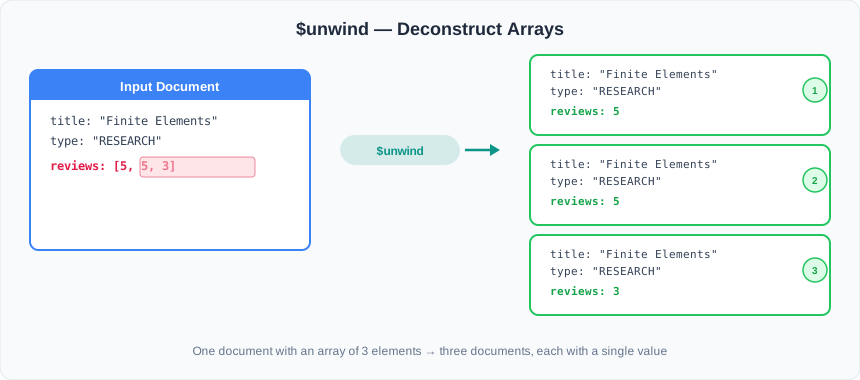
BEFORE ($unwind):                 AFTER ($unwind):

┌─────────────────────────┐      ┌─────────────────────────┐
│ title: "Finite Elements"│      │ title: "Finite Elements"│
│ type: "RESEARCH_PROJECT"│      │ type: "RESEARCH_PROJECT"│
│ reviews: [5, 5, 3]      │ ───▶ │ reviews: 5              │
└─────────────────────────┘      ├─────────────────────────┤
                                 │ title: "Finite Elements"│
                                 │ type: "RESEARCH_PROJECT"│
                                 │ reviews: 5              │
                                 ├─────────────────────────┤
                                 │ title: "Finite Elements"│
                                 │ type: "RESEARCH_PROJECT"│
                                 │ reviews: 3              │
                                 └─────────────────────────┘
Example
db.projects.aggregate([
  { $match: { type: "RESEARCH_PROJECT" } },
  { $unwind: "$reviews" },
  { $project: { title: 1, type: 1, reviews: 1 } },
  { $out: "projectreport" }
]);
Output:
{ title: "Finite Elements", type: "RESEARCH_PROJECT", reviews: 5 }
{ title: "Finite Elements", type: "RESEARCH_PROJECT", reviews: 5 }
{ title: "Finite Elements", type: "RESEARCH_PROJECT", reviews: 3 }
When to use: Whenever you need to process or aggregate individual array elements. A common pattern is
$unwind→$groupto re-aggregate arrays in a different way.
$out — Save Results to a Collection
Writes the pipeline’s output documents into a specified collection. If the collection already exists, it is completely replaced.
$out must always be the last stage in a pipeline.
Modern alternative:
$mergeStarting with MongoDB 4.2, the$mergestage is available and is more flexible than$out. While$outreplaces the entire target collection,$mergecan insert new documents, update existing ones, or replace individual documents.$mergealso supports sharded output collections. Consider using$mergefor production workloads.
db.<collection>.aggregate([
  { $out: "<name_of_collection>" }
]);
Example
db.projects.aggregate([
  {
    $match: { type: "RESEARCH_PROJECT" }
  },
  {
    $out: "projectreport"
  }
]);
// → All RESEARCH_PROJECT documents are now in the "projectreport" collection
Combining Document Stages
These stages are most powerful when combined. A typical pattern:
db.projects.aggregate([
  { $match: { type: "REQUEST_PROJECT" } },  // 1. Filter
  { $sort: { title: -1 } },                 // 2. Sort
  { $skip: 10 },                            // 3. Pagination offset
  { $limit: 5 },                            // 4. Page size
  { $out: "paginatedResults" }               // 5. Save
]);
Next: 05 - Structure Stages — learn how to reshape the documents themselves.