The Aggregation Pipeline
The core concept — understanding how data flows through stages.
← Previous | Index | Next: 03 - Sample Data →
What is a Pipeline?
A pipeline is a data structure for processing data through a sequence of stages. Each stage receives documents, processes them, and passes the results to the next stage.

┌──────────┐    ┌──────────┐    ┌──────────┐    ┌──────────┐
│Collection│───▶│ Stage 1  │───▶│ Stage 2  │───▶│ Stage 3  │───▶ Result
│          │    │ ($match) │    │($project)│    │ ($sort)  │
└──────────┘    └──────────┘    └──────────┘    └──────────┘
Key principles:
- Documents flow from one stage to the next — the output of stage N is the input to stage N+1.
- Documents can be added or removed — a stage can filter out documents, or generate new ones (e.g.,
$unwindsplits one document into many). - Document structure can change — within a stage, fields can be added, removed, renamed, or computed.
- No restrictions on stage order — you can arrange stages however you want, except that
$outand$mergemust be the last stage if used.
The aggregate() Method
You invoke a pipeline by calling aggregate() on a collection:
db.<collection>.aggregate(<pipeline>);The pipeline is an array of stage objects. Each stage is defined by an operator (like $match, $project, $sort):
db.projects.aggregate([
  {
    $match: {
      $nor: [
        { type: "RESEARCH_PROJECT" },
        { type: "REQUEST_PROJECT" }
      ]
    }
  },
  {
    $project: {
      type: 1,
      state: 1,
      description: 1
    }
  },
  { $sort: { follower_count: -1 } }
]);
This pipeline:
- Filters out research and request projects (
$match) - Selects only
type,state, anddescriptionfields ($project) - Sorts by
follower_countdescending ($sort)
Two Foundations of the Framework
The aggregation framework is built on two pillars:
1. Pipeline Processing
The pipeline defines what stages documents pass through — the overall flow.
2. Expressions
Expressions control how data is processed within a stage. They are formulas that compute values, compare data, manipulate arrays, etc.
Important: An expression typically has access only to the data of the current document being processed. It cannot reference other documents (with the exception of accumulator expressions in
$group).
See 08 - Expressions Overview for a deep dive.
Categories of Pipeline Stages
Pipeline stages fall into four categories, each serving a different purpose:
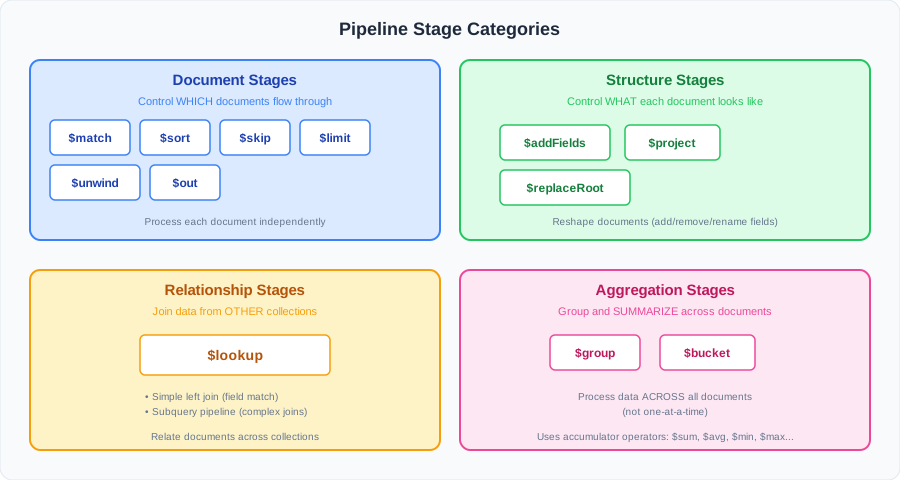
Document Stages → control the document stream
Determine which and how many documents pass through.
| Stage | What it does |
|---|---|
$match | Filter documents by criteria |
$sort | Reorder documents |
$skip | Drop the first n documents |
$limit | Keep only the first n documents |
$unwind | Split array fields into separate documents |
$out | Write results to a collection (replaces it) |
$merge | Write results to a collection (insert/update/replace — more flexible) |
→ See 04 - Document Stages
Structure Stages → reshape documents
Change what fields each document contains.
| Stage | What it does |
|---|---|
$addFields | Add new fields (keep existing ones) |
$project | Select, remove, rename, or compute fields |
$replaceRoot | Replace the entire document with a sub-document |
→ See 05 - Structure Stages
Relationship Stages → join collections
Bring in data from other collections.
| Stage | What it does |
|---|---|
$lookup | Left outer join / subquery pipeline |
→ See 06 - Relationship Stages
Aggregation Stages → group and summarize
Process data across all documents in the stage (not just one at a time).
| Stage | What it does |
|---|---|
$group | Group by a key and apply accumulators |
$bucket | Group by value ranges (intervals) |
→ See 07 - Aggregation Stages
Document Stages vs. Aggregation Stages
This is a crucial distinction:
Document stages process each document independently. The operator sees one document at a time and decides what to do with it.
Aggregation stages process documents collectively. The operator has access to data from all documents in the current stage — this is what enables grouping, summing, averaging, etc.
Document Stage:                  Aggregation Stage:

  doc1 ──▶ process ──▶ out1       doc1 ─┐
  doc2 ──▶ process ──▶ out2       doc2 ─┤──▶ process all ──▶ grouped results
  doc3 ──▶ process ──▶ out3       doc3 ─┘
Next Steps
Before diving into the stages, let’s set up the 03 - Sample Data we’ll use throughout the examples.