Expressions Overview
The language inside stages — how to compute, compare, and transform values.
← Previous | Index | Next: 09 - Arithmetic Operators →
What Are Expressions?
Expressions are formulas used within pipeline stages to process document data. They let you compute new values, compare fields, manipulate arrays, and control logic.
Key rules:
- An expression always operates on the current document — it cannot see other documents (except in
$groupstages). - Certain expressions can only be used with certain stage operators.
- The expression syntax is recursive — you can nest expressions to build complex computations.
Expression Syntax
An expression can be one of four things:
<expression> = <field path>           // reference a field: "$fieldName"
             | <literal value>        // a constant: 42, "hello", true
             | <system variable>      // $$CURRENT, $$ROOT, etc.
             | <expression operator>  // { $add: [...] }, { $cond: {...} }
An expression operator takes one or more expressions as arguments:
// Single-argument form
{ <operator>: <expression> }

// Multi-argument form
{ <operator>: [<expr1>, <expr2>, ...] }
Nesting expressions
Because operators take expressions as arguments, you can nest them freely:
{
  $multiply: [
    { $add: [3, 3] },     // inner: 3 + 3 = 6
    10                      // 6 × 10 = 60
  ]
}
Field Paths: The $ Operator
The $ prefix accesses a field’s value in the current document:
"$title"           // → value of the "title" field
"$fundings.amount" // → value of nested field "amount" in "fundings"
"$reviews"         // → the entire reviews array
Categories of Expression Operators
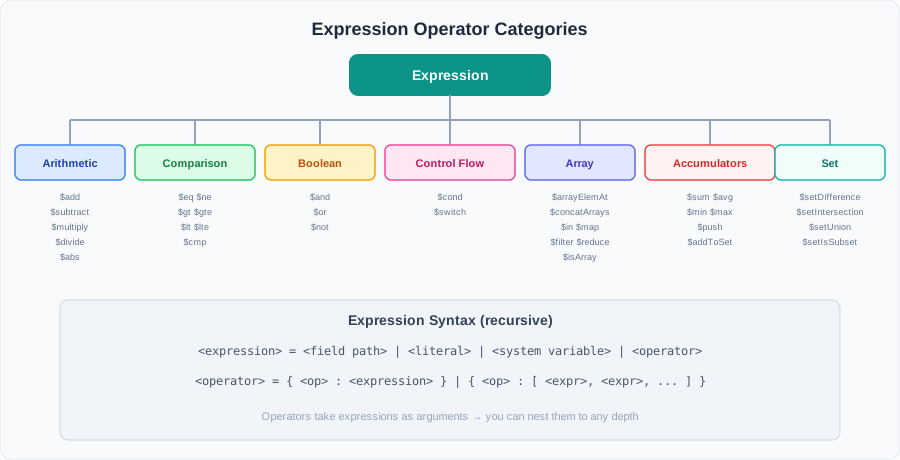
| Category | Operators | Description |
|---|---|---|
| Arithmetic | $add, $subtract, $multiply, $divide, $abs | Math on numbers |
| Comparison | $eq, $ne, $gt, $gte, $lt, $lte, $cmp | Compare two values |
| Boolean | $and, $or, $not | Combine conditions |
| Control Flow | $cond, $switch | If/else, switch/case |
| Array | $arrayElemAt, $map, $filter, $reduce, $in, $concatArrays, $isArray | Process arrays |
| Accumulators | $sum, $avg, $min, $max, $push, $addToSet | Aggregate across documents |
| Variables | $$CURRENT, $expr, $let | Reference variables |
| Set | $setDifference, $setIntersection, $setUnion, $setIsSubset | Set operations on arrays |
Where Expressions Are Used
Expressions appear inside pipeline stages:
db.projects.aggregate([
  {
    $addFields: {                          // stage operator
      totalFunding: { $sum: "$fundings.amount" },  // expression
      isApproved: { $eq: ["$state", "APPROVED"] }  // expression
    }
  }
]);
The stage ($addFields) determines where expressions are evaluated. The expressions themselves determine what is computed.
Next: 09 - Arithmetic Operators — start with the simplest expressions: math.