Aggregation Stages
Group and summarize — process data across multiple documents.
← Previous | Index | Next: 08 - Expressions Overview →
Aggregation stages are fundamentally different from other stages: instead of processing documents one at a time, they process documents collectively. This enables grouping, summing, counting, and other cross-document operations.
$group — Group by Key
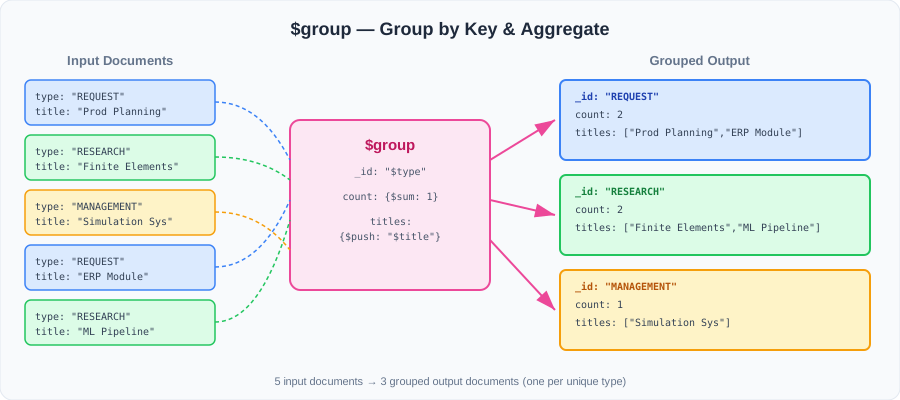
The $group stage groups documents by a specified key and applies accumulator expressions to each group.
db.<collection>.aggregate([
  {
    $group: {
      _id: <grouped_by_expression>,         // what to group by
      <new_field>: { <accumulator>: <expr> } // computed fields
    }
  }
]);_iddefines the grouping key — documents with the same_idvalue end up in the same group- Each additional field uses an accumulator like
$sum,$avg,$min,$max,$push, etc.
Example: Count projects by type
db.projects.aggregate([
  {
    $group: {
      _id: "$type",
      projectCount: { $sum: 1 }
    }
  },
  { $out: "projectReport" }
]);
Output:
{ _id: "REQUEST_PROJECT",    projectCount: 1 }
{ _id: "RESEARCH_PROJECT",   projectCount: 1 }
{ _id: "MANAGEMENT_PROJECT", projectCount: 1 }
How $group works visually
Advanced Example: Find the highest-funded project
This combines multiple stages and techniques:
db.projects.aggregate([
  // Step 1: Calculate total funding per project
  {
    $addFields: {
      projectFunding: { $sum: "$fundings.amount" }
    }
  },
  // Step 2: Find the maximum funding across all projects
  {
    $group: {
      _id: null,                                  // group ALL documents
      projectFunding: { $max: "$projectFunding" }
    }
  },
  // Step 3: Look up which project(s) have that funding
  {
    $lookup: {
      from: "projects",
      let: { funds: "$projectFunding" },
      pipeline: [
        {
          $addFields: {
            funds: { $sum: "$fundings.amount" }
          }
        },
        {
          $match: {
            $expr: { $eq: ["$funds", "$$funds"] }
          }
        }
      ],
      as: "projects"
    }
  },
  // Step 4: Unwrap and promote the project to root
  { $unwind: { path: "$projects" } },
  { $replaceRoot: { newRoot: "$projects" } }
]);
Note: Setting
_id: nullgroups all documents into a single group — useful for computing global aggregates like max, min, or total.
$bucket — Group by Value Ranges
The $bucket stage groups documents into “buckets” based on value intervals. Think of it as a histogram.
db.<collection>.aggregate([
  {
    $bucket: {
      groupBy: <expression>,                    // field to bucket by
      boundaries: [<low1>, <low2>, <low3>,...], // bucket boundaries
      output: {
        <field1>: { <accumulator>: <expr> },
        ...
      }
    }
  }
]);
The boundaries array defines the edges of each bucket. A value falls into bucket i if it is ≥ boundaries[i] and < boundaries[i+1].
Example: Group subprojects by research focus
// Buckets:
//   0–50:  "low applied research"
//   51–100: "high applied research"

db.subprojects.aggregate([
  {
    $bucket: {
      groupBy: "$appliedResearch",
      boundaries: [0, 51, 101],
      output: {
        count: { $sum: 1 },
        titles: { $push: "$title" }
      }
    }
  }
]);
Output:
{
  _id: 0,      // bucket for values 0–50
  count: 3,
  titles: ["ERP SAP", "Web-based Systems", "API Design SAP"]
}
{
  _id: 51,     // bucket for values 51–100
  count: 1,
  titles: ["Embedded Systems"]
}
When to use
$bucketvs$group:
$group: when you want to group by discrete values (categories, types, names)$bucket: when you want to group by numeric ranges (age ranges, price tiers, score bands)
Accumulators Available in Aggregation Stages
These operators only work inside $group and $bucket (and in $addFields when applied to arrays):
| Operator | Description |
|---|---|
$sum | Sum of values or count (with $sum: 1) |
$avg | Average of values |
$min | Minimum value |
$max | Maximum value |
$push | Collect all values into an array |
$addToSet | Collect unique values into an array |
→ See 13 - Accumulator Operators for detailed examples.
Next: 08 - Expressions Overview — learn the expression language that powers all pipeline stages.