Relationship Stages
Join collections — relate documents across collections with
$lookup.
← Previous | Index | Next: 07 - Aggregation Stages →
Relationship stages let you bring in data from other collections — essentially performing joins in a document database.
$lookup — Join Collections
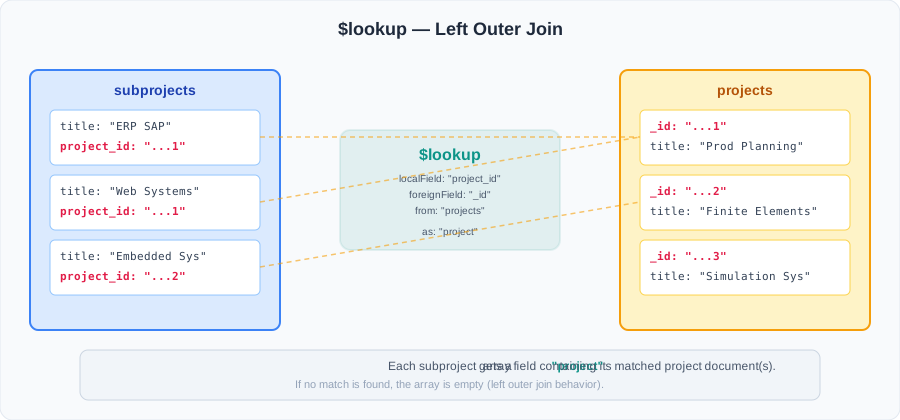
The $lookup stage performs a left outer join with another collection. It comes in two forms:
- Simple left join — match a local field to a foreign field
- Subquery pipeline — run an entire pipeline on the joined collection
Form 1: Simple Left Join
db.<collection>.aggregate([
  {
    $lookup: {
      from:         <collection to join>,      // target collection
      localField:   <field in input document>, // field in current docs
      foreignField: <field in target docs>,    // field in target docs
      as:           <output array field>       // result stored here
    }
  }
]);
The result of the join is stored as an array in the field specified by as. If no match is found, the array will be empty (it’s a left outer join).
Example: Join subprojects with their parent projects
Using the sample data:
db.subprojects.aggregate([
  {
    $match: {
      appliedResearch: { $gt: 10 }
    }
  },
  {
    $lookup: {
      from: "projects",
      localField: "project_id",
      foreignField: "_id",
      as: "project"
    }
  },
  {
    $unwind: "$project"     // convert single-element array to object
  },
  {
    $project: {
      _id: 0,
      title: 1,
      appliedResearch: 1,
      focusResearch: 1,
      project: 1
    }
  },
  { $sort: { title: 1 } },
  { $out: "subprojectReport" }
]);
What happens step by step:
subprojects          $lookup             $unwind           $project
┌────────-──┐    ┌──────────────────┐  ┌──────────────┐  ┌────────────┐
│ title     │    │ title            │  │ title        │  │ title      │
│ project_id│───▶│ project_id       │─▶│ project: {   │─▶│ project:{} │
│           │    │ project: [...]   │  │   title,type │  │ applied... │
└─────────-─┘    └──────────────────┘  │ }            │  └────────────┘
                                       └──────────────┘
Tip: After
$lookup, the result is always an array. Use$unwindto “unwrap” it if you expect exactly one matching document.
Output:
{
  title: "ERP SAP",
  appliedResearch: 20,
  focusResearch: 80,
  project: {
    _id: ObjectId("...1"),
    title: "Production Planning Systems",
    type: "REQUEST_PROJECT",
    reviews: [4, 4, 3, 3, 4],
    fundings: [...]
  }
}
// ... more documents
Form 2: Subquery Pipeline
For more complex joins, you can run a full pipeline on the target collection. This lets you filter, project, and transform the joined data.
db.<collection>.aggregate([
  {
    $lookup: {
      from: <collection to join>,
      let: {
        <var_1>: <expression>,    // define variables from current doc
      },
      pipeline: [                 // pipeline to run on target collection
        <stage1>,
        <stage2>,
        ...
      ],
      as: <output array field>
    }
  }
]);
Key differences from the simple form:
letdefines variables that the subquery pipeline can access- Use
$$varNameto reference these variables inside the pipeline - Use
$exprto use expressions in$matchwithin the pipeline
Example: Subquery pipeline
db.debitors.aggregate([
  {
    $lookup: {
      from: "projects",
      let: {
        pid: "$fundings.project_id",
        debid: "$_id"
      },
      pipeline: [
        { $unwind: "$fundings" },
        {
          $match: {
            $expr: {
              $and: [
                { $in: ["$_id", "$$pid"] },
                { $eq: ["$$debid", "$fundings._id"] }
              ]
            }
          }
        },
        {
          $project: {
            title: 1,
            type: "$projectType",
            state: "$projectState"
          }
        }
      ],
      as: "projects"
    }
  },
  {
    $project: {
      name: 1,
      projects: 1
    }
  },
  { $out: "debitorReport" }
]);
When to use the subquery form:
- You need to filter the joined documents
- You need to transform the joined data before attaching it
- The join condition is complex (more than a simple field equality)
Summary of $lookup Forms
| Feature | Simple Left Join | Subquery Pipeline |
|---|---|---|
| Join condition | Single field equality | Any expression |
| Can filter joined data | No | Yes (via $match in pipeline) |
| Can transform joined data | No | Yes (via any stage) |
| Variable passing | Not needed | Via let + $$varName |
Next: 07 - Aggregation Stages — group and summarize data across documents.