Distributed Systems – Setting the Scene
One click, many systems
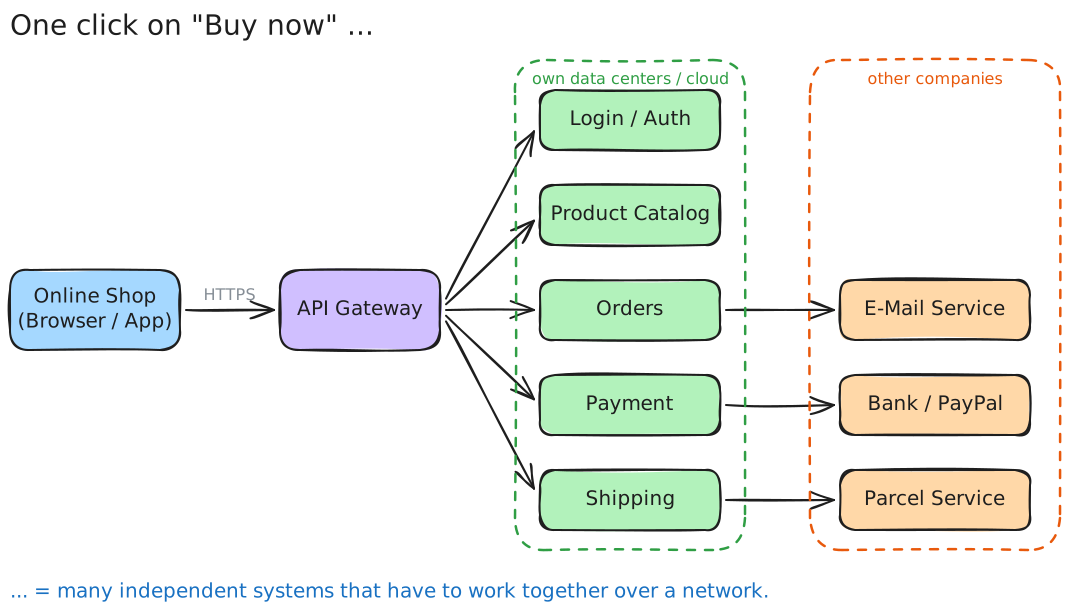
What happens when you click “Buy now” in an online shop?
- Your browser sends a request to the shop.
- The shop checks who you are, whether the product is in stock, creates an order, asks a bank to charge you, books a parcel service and sends you an e-mail.
- These parts run on different machines, often in different data centers and even at different companies.
You see one website — behind it work dozens of independent systems.
Definition
A distributed system is a collection of independent computers that appears to its users as a single coherent system. — Andrew S. Tanenbaum
Three key words:
| Keyword | Meaning |
|---|---|
| independent | every node has its own CPU, memory, OS — and can fail on its own |
| network | nodes only communicate by sending messages (no shared memory) |
| single system | the user should not notice that many computers are involved |
Monolith vs. distributed system
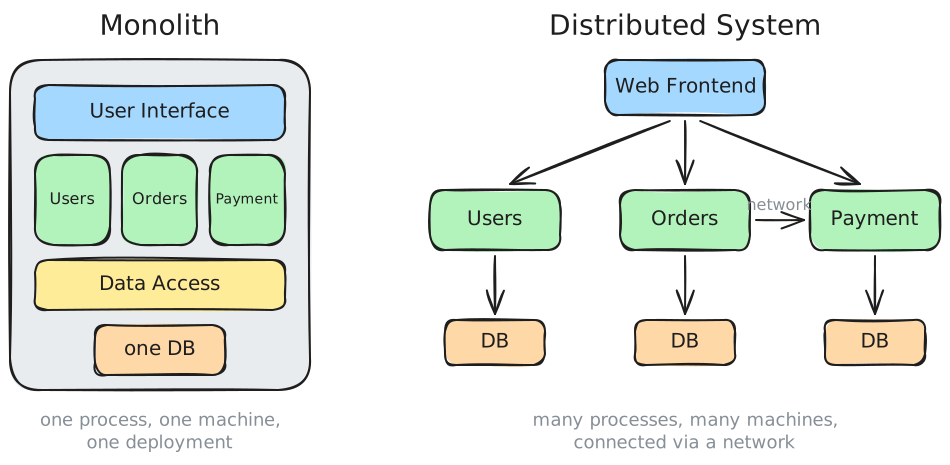
| Monolith | Distributed system | |
|---|---|---|
| Deployment | one big unit | many small units |
| Communication between parts | function call (nanoseconds) | network message (milliseconds) |
| Failure | everything or nothing | parts can fail independently |
| Scaling | scale the whole thing | scale only the part that needs it |
| Complexity | in the code | in the communication between parts |
A monolith is not bad — it is often the right choice for small projects. Distribution is a trade-off.
Why distribute at all?
- Scalability – one machine is not enough for millions of users.
- Availability – if one machine fails, others take over.
- Geography – servers close to the users (lower latency), data must stay in a certain country (GDPR).
- Organisation – different teams own different parts and deploy independently.
- Reuse / integration – use services of others (payment, maps, weather, login with Google …).
- Resources – some things only exist in one place (a sensor, a printer, a special database).
Everyday examples
| System | Why is it distributed? |
|---|---|
| WhatsApp / Signal | billions of users, messages must arrive even if the receiver is offline |
| Netflix / YouTube | video is delivered from servers close to you (CDN) |
| Online banking | bank, card network, other banks — different organisations |
| Online games | game servers worldwide, low latency required |
| Smart home / IoT | sensors, hubs, cloud and app all talk to each other |
| WebUntis | browser, app and server, shared by many schools |
Part 1: Architectures
How are the parts of a distributed system arranged and who talks to whom?
Client-Server
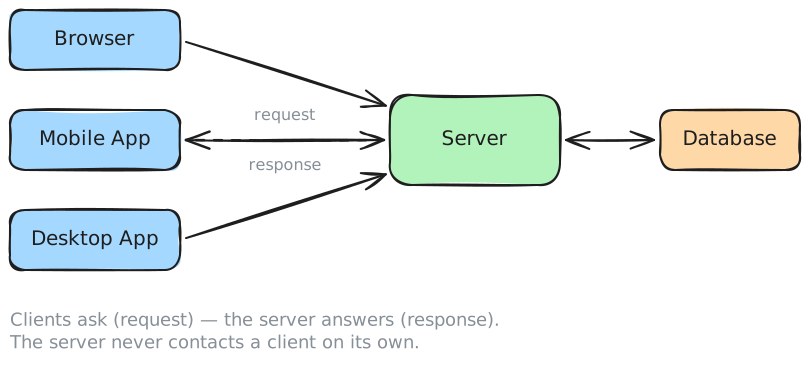
- Server: offers a service, waits for requests.
- Client: uses the service, starts the communication.
- Roles are fixed. The server does not know the clients in advance.
Examples: web (browser ↔ web server), e-mail (client ↔ mail server), database access.
| ✅ Pros | ❌ Cons |
|---|---|
| simple, easy to understand | server is a single point of failure |
| central control over data & security | server can become a bottleneck |
Multi-Tier (e.g. 3-Tier) Architecture
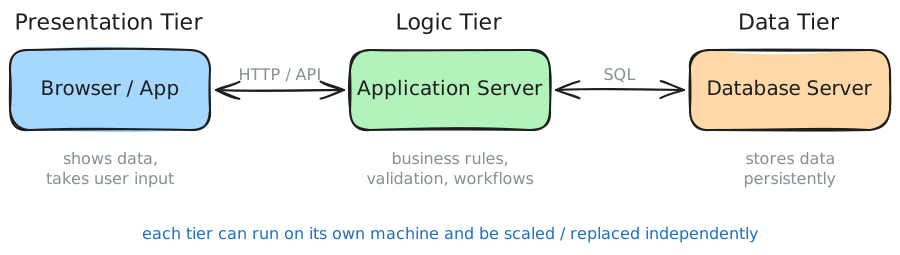
An extension of client-server: the server side is split into layers (tiers):
- Presentation tier – user interface (browser, app)
- Logic tier – business rules (“a student may only borrow 3 books”)
- Data tier – persistent storage (database)
Each tier only talks to its neighbour. This is the classic architecture of most web applications.
Peer-to-Peer (P2P)
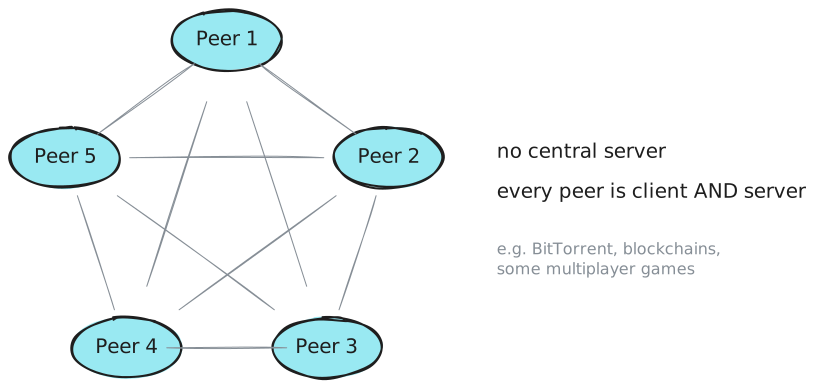
- All nodes (peers) are equal — each one is client and server.
- No central server (or only a small one to find other peers).
| ✅ Pros | ❌ Cons |
|---|---|
| no single point of failure | hard to control / secure |
| scales with the number of users | finding data is complex |
| peers come and go at any time |
Microservices
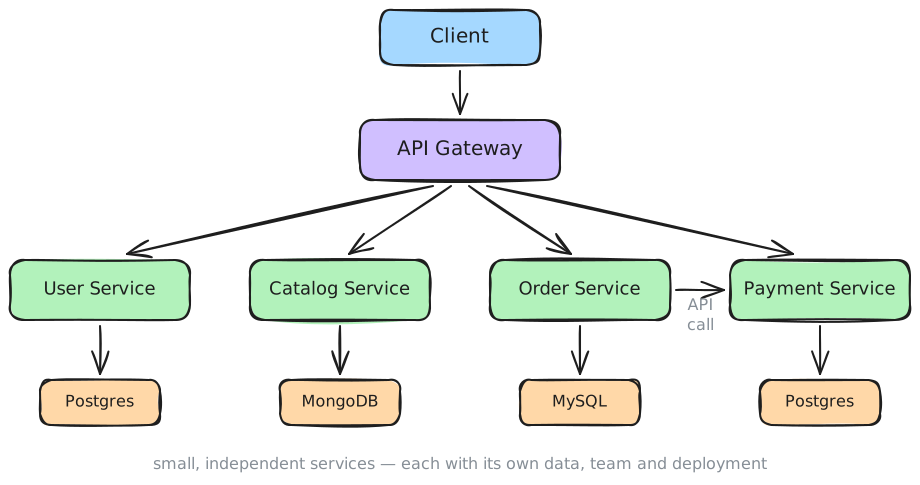
The application is split into many small, independent services:
- each service does one thing (users, orders, payment …)
- each has its own database — nobody else accesses it directly
- each can be developed, deployed and scaled independently (often by its own team)
- they communicate only via APIs (or messages)
- an API Gateway is the single entry point for clients
Microservices are the opposite of a monolith. They solve organisational and scaling problems — and create many new communication problems.
Event-driven / Publish-Subscribe
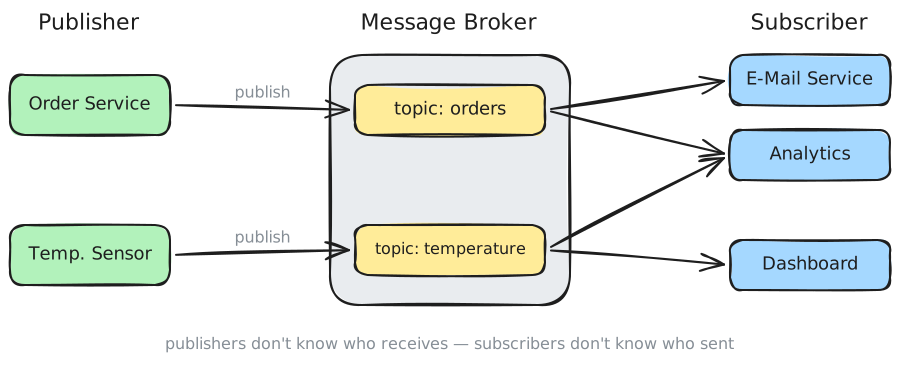
- A publisher sends a message (event) to a topic on a message broker.
- All subscribers of that topic receive the message.
- Publisher and subscribers do not know each other.
Example: “Order created” → the e-mail service sends a confirmation, analytics updates the statistics, the warehouse starts packing. The order service does not need to know any of them.
Technologies: MQTT (IoT), AMQP / RabbitMQ, Apache Kafka.
Architectures – overview
| Architecture | Who talks to whom? | Typical use |
|---|---|---|
| Client-Server | many clients → one server | web, e-mail, databases |
| Multi-Tier | presentation → logic → data | web applications |
| Peer-to-Peer | everyone ↔ everyone | file sharing, blockchain |
| Microservices | services ↔ services via APIs | large web platforms |
| Event-driven | publisher → broker → subscribers | IoT, decoupled workflows |
Real systems usually combine several of these.
Part 2: Requirements
What makes a distributed system good? And why is it hard?
Functional vs. non-functional requirements
- Functional requirements – what the system does
- “A user can place an order.”
- “A teacher can enter grades.”
- Non-functional requirements (quality attributes) – how well it does it
- “The page loads in under 1 second.”
- “The system is available 99.9 % of the time.”
For distributed systems the non-functional requirements are the hard part.
Transparency
The user should not notice that the system is distributed. The system hides:
| Transparency | Hides … | Example |
|---|---|---|
| Access | how a resource is accessed | a network drive looks like a local folder |
| Location | where a resource is | www.google.com – you don’t know which server answers |
| Replication | that copies exist | your Instagram photo is stored many times |
| Failure | that a part has failed | a server crashes, another one answers |
| Concurrency | that others use it at the same time | thousands buy concert tickets at once |
Scalability
The system can handle more load by adding resources.
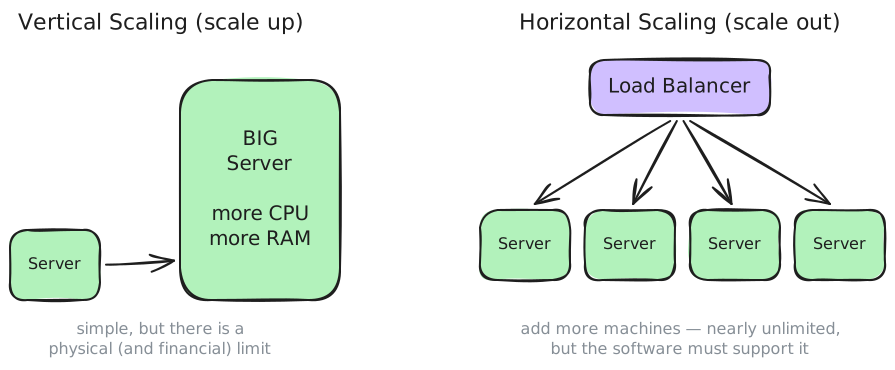
- Vertical scaling (scale up): a bigger machine.
- Horizontal scaling (scale out): more machines + a load balancer.
Horizontal scaling only works if the software is built for it — e.g. a server must not keep user data only in its own memory (→ stateless services).
Availability
What percentage of the time is the system usable?
| Availability | Downtime per year | |
|---|---|---|
| 99 % | ≈ 3.65 days | ”two nines” |
| 99.9 % | ≈ 8.8 hours | ”three nines” |
| 99.99 % | ≈ 53 minutes | ”four nines” |
| 99.999 % | ≈ 5 minutes | ”five nines” |
⚠️ Dependencies multiply: if a request needs service A (99.9 %) and service B (99.9 %), the total availability is only 0.999 × 0.999 ≈ 99.8 %.
→ more parts = more things that can break → redundancy (several copies) is needed.
Fault tolerance
In a distributed system something is always broken somewhere.
- Partial failure: one part fails, the rest keeps running — but you may not even know which part failed.
- A missing answer can mean: the request got lost, the server crashed, the server is slow, or the answer got lost.
Typical techniques:
- Timeouts – don’t wait forever
- Retries – try again (but careful: don’t order the pizza twice! → idempotency)
- Redundancy / replication – several copies of data and services
- Graceful degradation – if recommendations fail, still show the shop
Consistency & the CAP theorem
If data is stored on several nodes: does everybody see the same data at the same time?
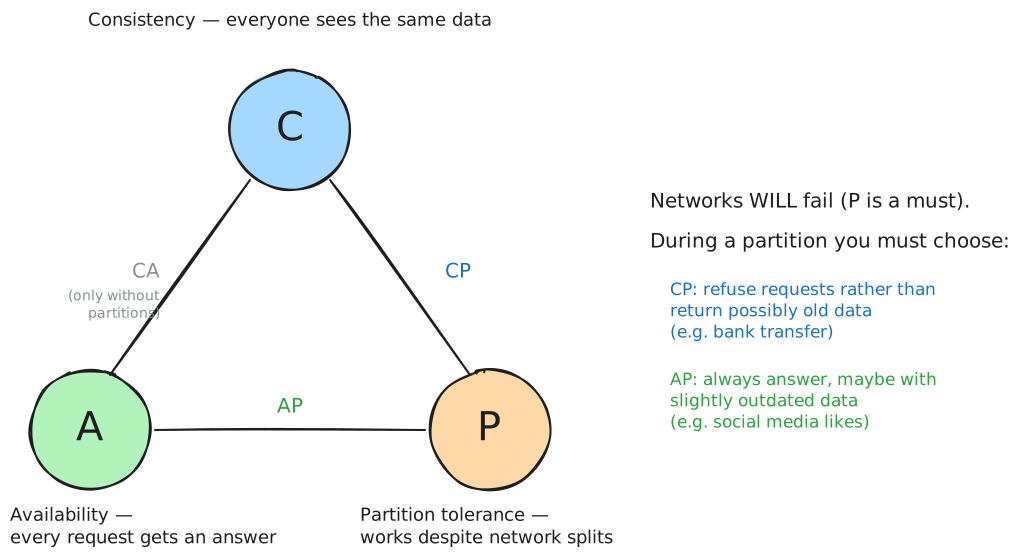
CAP theorem (Eric Brewer, 2000): when the network is split (Partition), a system can either stay Consistent or Available — not both.
- Strong consistency: every read returns the latest write (banking).
- Eventual consistency: copies become equal after a short time (likes, view counters, DNS).
Performance & latency
Every network message costs time.
| Action | Approx. time |
|---|---|
| read from RAM | ~0.0001 ms |
| read from SSD | ~0.1 ms |
| round trip within a data center | ~0.5 ms |
| round trip Vienna ↔ New York | ~100 ms |
A function call in a monolith is ~1 million times faster than a network call. Design consequence: don’t send 100 small requests if one bigger request does the job.
Security
The network is not a trusted place:
- Confidentiality – nobody else can read the data → encryption (TLS / HTTPS)
- Integrity – nobody can change the data on the way
- Authentication – who are you? (login, API keys, tokens)
- Authorization – what are you allowed to do?
Every interface that is reachable over the network is a potential attack surface.
The 8 Fallacies of Distributed Computing
False assumptions that developers new to distributed systems typically make (L. Peter Deutsch & others, Sun Microsystems):
- The network is reliable.
- Latency is zero.
- Bandwidth is infinite.
- The network is secure.
- Topology doesn’t change.
- There is one administrator.
- Transport cost is zero.
- The network is homogeneous.
👉 All eight are wrong. Good distributed systems are designed with this in mind.
Requirements – overview
| Requirement | Question |
|---|---|
| Transparency | Does the user notice the distribution? |
| Scalability | Can it handle 10× more users? |
| Availability | Is it reachable when needed? |
| Fault tolerance | What happens if a part fails? |
| Consistency | Does everyone see the same data? |
| Performance | How fast are the answers? |
| Security | Who can read / change what? |
| Maintainability | Can parts be changed without breaking others? |
Many of these conflict with each other (e.g. consistency vs. availability, security vs. performance). Designing distributed systems means making trade-offs.
Part 3: Interfaces
The parts of a distributed system must talk to each other. How do they agree on how to talk?
Communication: synchronous vs. asynchronous
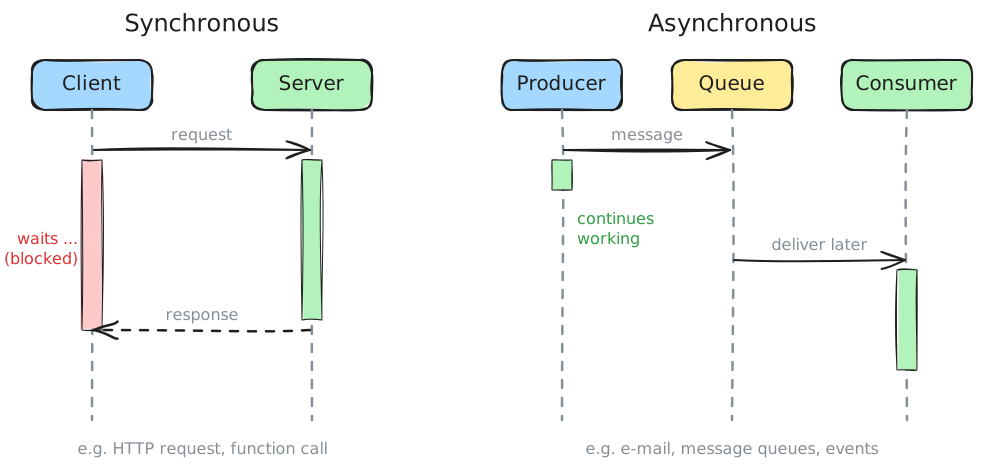
| Synchronous | Asynchronous | |
|---|---|---|
| Sender | waits for the answer | continues immediately |
| Coupling in time | both must be online | receiver can be offline |
| Example | HTTP request, phone call | message queue, e-mail, SMS |
| Good for | ”I need the answer now" | "something happened, react to it” |
What is an interface?
An interface is the boundary between two components: everything one side needs to know to use the other.
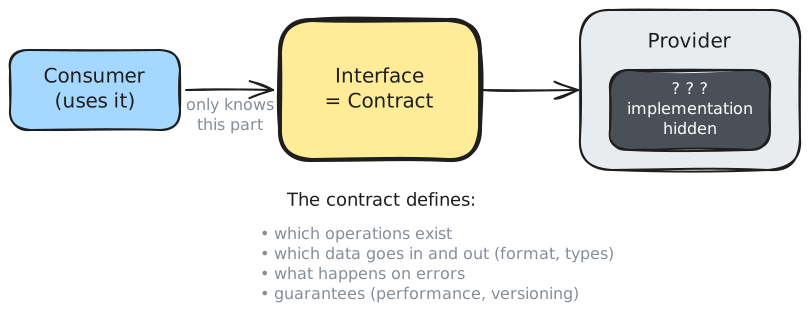
- The interface is a contract between provider and consumer.
- The provider is a black box: how it works internally is hidden (information hiding).
- As long as the contract stays the same, the provider can change its implementation freely.
Interfaces exist everywhere: a power socket, USB, a C# interface, a REST API …
Kinds of interfaces
| Kind | Example | Where? |
|---|---|---|
| Hardware interface | USB, HDMI, Ethernet port | between devices |
| Library interface | List<T>.Add(), Math.Sqrt() | in the same process |
| OS interface | system calls: open(), read() | program ↔ operating system |
| Network / remote interface | GET /api/students/42 | between processes over a network |
In distributed systems we care about the last one. It is usually called an API (Application Programming Interface) — and it needs a protocol to travel over the network (→ next scriptum).
Coupling
How strongly do two components depend on each other?
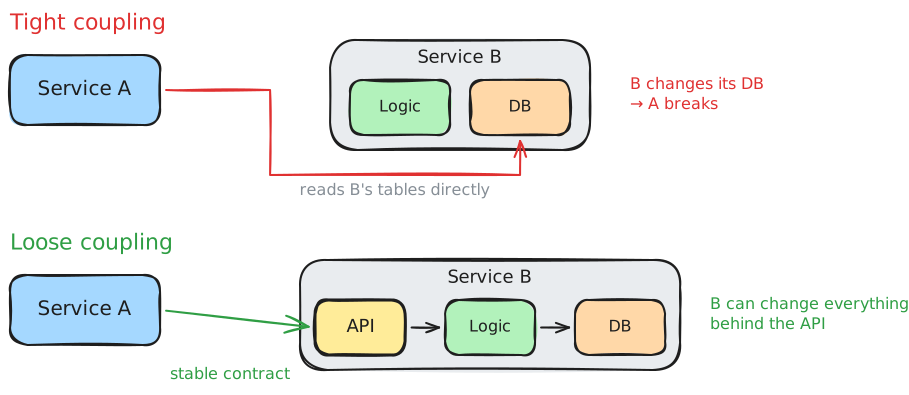
- Tight coupling: A knows internals of B (its database, its classes). Every change in B can break A.
- Loose coupling: A only knows B’s interface. B can change everything behind it.
Goal: high cohesion inside a component, loose coupling between components.
Part 4: Interface Design
A good interface is hard to change later — so it is worth designing it carefully.
Principles of good interface design
- Design for the consumer – what does the user of the interface need? (not: what does my database look like?)
- Consistency – same naming, same structure, same error format everywhere.
- Clear, self-explaining names –
getStudentByIdbeatsgsbi. - Keep it minimal – every operation you publish, you have to support forever.
- Hide implementation details – never expose database IDs, table names or stack traces just because it is easy.
- Clear error handling – the consumer must be able to tell what went wrong and whose fault it was.
- Document it – an interface without documentation does not exist for others.
- Secure by default – authentication, validation of all input.
Granularity: chatty vs. chunky
Network calls are expensive (→ latency). How much should one call do?
Chatty (many small calls):
getStudentName(42)
getStudentClass(42)
getStudentBirthday(42)
Chunky (one call with everything needed):
getStudent(42) → { name, class, birthday }
Too fine = slow. Too coarse = consumers get lots of data they don’t need. → design along the use cases of the consumer.
Contract-first vs. code-first
| Contract-first (design-first) | Code-first |
|---|---|
| 1. write the interface description | 1. write the code |
| 2. agree on it with all teams | 2. generate the description from the code |
| 3. implement both sides in parallel | 3. others use it |
| ✅ well-thought-out, teams work in parallel | ✅ fast to start |
| ❌ more work upfront | ❌ interface follows the implementation, not the needs |
The interface description is written in a machine-readable format (e.g. OpenAPI) .
Changing interfaces: versioning & compatibility
Once others use your interface, you can’t just change it.
| Change | Breaking? |
|---|---|
| add a new optional field to the response | ✅ non-breaking |
| add a new operation | ✅ non-breaking |
| add a new required input field | ❌ breaking |
| rename or remove a field | ❌ breaking |
change a data type ("42" → 42) | ❌ breaking |
| change the meaning of a value | ❌ breaking (and the worst kind!) |
Breaking changes need a new version (e.g. /api/v2/...) — and the old version must keep running for a while.
Robustness principle (Postel’s law): “Be conservative in what you send, be liberal in what you accept.”
Idempotency
An operation is idempotent if executing it once or several times has the same effect.
| Operation | Idempotent? |
|---|---|
| “set the temperature to 21 °C” | ✅ yes |
| ”delete order 17” | ✅ yes (after the first call it is gone) |
| “increase the temperature by 1 °C” | ❌ no |
| ”create a new order” | ❌ no |
Why does this matter? Because of the network: if you get no answer, you don’t know if the request arrived. With idempotent operations you can simply retry safely.
Summary
- A distributed system = independent computers that communicate via messages and look like one system.
- Architectures: client-server, multi-tier, peer-to-peer, microservices, event-driven.
- Requirements: transparency, scalability, availability, fault tolerance, consistency, performance, security — often in conflict (CAP!).
- The network is unreliable, slow and insecure (8 fallacies).
- Components communicate via interfaces = contracts. Goal: loose coupling.
- Good interfaces are consumer-oriented, consistent, minimal, documented, versioned and ideally idempotent.
Exercises
1 – Recognise the architecture
Which architecture(s) do the following systems use? Justify your answer.
- Minecraft multiplayer server
- BitTorrent
- WebUntis
- A smart-home system with temperature sensors and a dashboard app
- Netflix
2 – Fallacies in practice
Which of the 8 fallacies did the developer forget?
- The app shows a loading spinner forever when the train enters a tunnel.
- A mobile app downloads 50 MB of images on every start.
- Passwords are sent unencrypted because “it’s only our internal network”.
- A service stops working because the IP address of the database server changed.
- The app calls the server 200 times to build one page — works fine at home, terrible on mobile data.
3 – Availability
A web shop needs the following services for one order: Gateway (99.99 %), Order service (99.9 %), Payment service (99.9 %), Database (99.95 %).
- Calculate the total availability.
- How many hours per year is the shop not able to take orders?
- Suggest a measure to improve the availability.
4 – Design an interface
The school canteen wants to offer online ordering. Students should be able to see the menu of the week, order a meal for a specific day, and cancel an order up to 9:00 on that day.
- List the operations the interface needs (name, input, output).
- Which errors can occur? How should the consumer be informed?
- Which operations are idempotent?
- Half a year later, the canteen wants to add allergen information to the menu and make the class a required field when ordering. Which change is breaking, which isn’t?